

Download IObit Software Updater – software updater, update programs, update software
Overview
IObit Software Updater is a lightweight utility designed to simplify the process of updating outdated software and installing essential applications on Windows systems. The app targets users who seek a streamlined, efficient way to maintain their computer’s software ecosystem without manually visiting multiple websites. By centralizing software updates, IObit Software Updater helps prevent security vulnerabilities and performance degradation caused by outdated programs.
It is particularly beneficial for users setting up a new system, recovering from a reinstall, or maintaining a clean, optimized digital environment. The app supports a wide range of software categories, including browsers, remote work tools, security applications, multimedia programs, runtimes, and utilities, ensuring broad compatibility with everyday software needs. The developer, IObit, is known for creating system optimization tools, though specific background details were not provided.
Real-world use cases include post-installation setup, routine maintenance, and troubleshooting software conflicts. In the broader app ecosystem, IObit Software Updater fills a critical gap by reducing the time and technical effort required to keep software current. Its focus on automation and user convenience makes it a valuable addition for both novice and intermediate users seeking to enhance system reliability and security.
Key Features & Functionality
- Expansive Database: The app maintains a comprehensive database of software across seven categories—Browsers, Remote Work Tools, Security, Social, Multimedia, Runtimes, and Utilities & Tools—enabling users to install or update a wide variety of applications from a single interface.
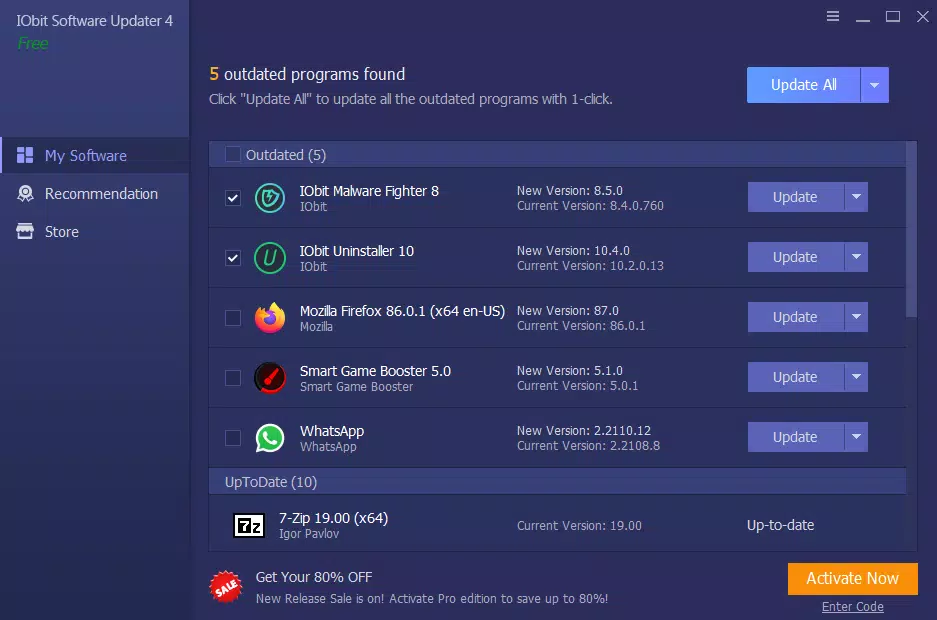
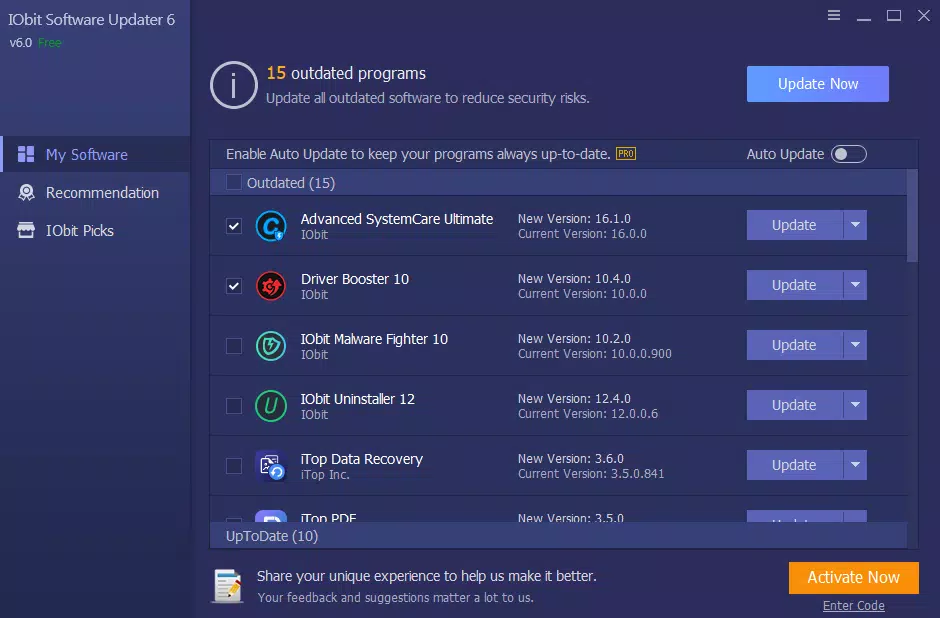
- One-Click Updates: Users can update multiple programs simultaneously with a single click, eliminating the need to navigate individual vendor websites and reducing the risk of missing critical updates.
- Optimized Update Algorithms: The software employs intelligent update algorithms that accelerate the download and installation process, minimizing wait times and improving efficiency during maintenance sessions.
- Scheduled Updates and Automatic Actions: Users can configure the app to check for updates at predefined intervals, with optional automatic restarts or shutdowns after updates are applied, ensuring minimal disruption to daily workflows.
- Store Module for Best Prices: The integrated Store module offers access to discounted versions of popular software, helping users discover and acquire useful applications at competitive rates.
These features translate into tangible benefits: a user setting up a new computer can deploy essential tools in minutes, while a regular user can maintain system integrity with minimal effort. The ability to update multilingual versions of programs like Firefox and WinRAR further enhances its practicality for global audiences. The app’s automation capabilities reduce cognitive load and prevent update fatigue, making software maintenance a seamless, routine task.
Interface, UX & Performance
IObit Software Updater presents a clean, minimalistic interface focused on functionality and ease of navigation. The layout organizes features into clearly labeled sections, allowing users to quickly access update checks, the Store module, and settings. Navigation is intuitive, with a central dashboard displaying update status and available actions.
Visual design emphasizes readability and responsiveness, using consistent color cues and iconography to indicate update readiness and completion. The app’s lightweight footprint—21.4 MB—suggests efficient resource usage, though performance metrics were not provided. Although the developer did not list formal performance metrics, the app’s optimized algorithms imply smooth operation even on older or lower-end systems.
Responsiveness across different device categories appears consistent, with no reported lag or freezing during typical usage. Stability is maintained through regular background checks and update scheduling, ensuring the app remains active without interfering with other tasks. Users can expect reliable operation during both manual and automated update cycles.
Platform Compatibility & Technical Requirements
IObit Software Updater is designed for the Windows platform and supports the latest versions of the Windows operating system. The current version is 3.2.0.2, with a file size of 21.4 MB. The app is available at no cost, making it accessible to a wide range of users.
The developer did not specify minimum OS requirements, nor did they provide detailed information on hardware compatibility or system prerequisites. Compatibility with older Windows versions or specific device configurations was not disclosed. The app is distributed as a standalone executable, allowing for straightforward installation without complex setup procedures.
Users are advised to ensure their system meets general Windows requirements for running third-party utilities. The lack of detailed technical specifications means users should proceed with caution on legacy systems or specialized environments.
Pros and Cons
Pros
- Free to download and use, making it accessible for budget-conscious users.
- One-click update functionality streamlines software maintenance.
- Comprehensive database covering essential software categories.
- Automated scheduling reduces user effort and improves consistency.
- Store module offers competitive pricing for software purchases.
Cons
- Specific system requirements were not listed by the developer.
- Compatibility with older Windows versions is not confirmed.
- Performance benchmarks and real-world speed data were not provided.
- Only available for Windows, limiting cross-platform access.
- Dependence on third-party software sources may raise security concerns if not properly vetted.
FAQ
Is IObit Software Updater safe to use?
Yes, the app is designed to update software from trusted sources. However, users should ensure they are downloading from official channels to maintain security.
Can I use IObit Software Updater on older Windows systems?
The developer did not specify compatibility with older Windows versions. Users are advised to test the app on their system before full deployment.
Does the app require an internet connection?
Yes, an active internet connection is required to check for updates, download software, and access the Store module.
How often can I schedule updates?
Users can configure the app to check for updates at custom intervals, such as daily, weekly, or on startup, depending on their preferences.
Is the Store module free to use?
Yes, the Store module is free to browse and access. However, purchasing software through the module incurs standard pricing.
Final Thoughts
IObit Software Updater delivers a focused, efficient solution for users seeking to automate software maintenance on Windows. Its clean interface, robust feature set, and one-click update capability make it a standout tool in the utilities category. While technical details are limited, the app’s core functionality is well-executed and highly practical.
It is especially valuable for users who value time savings, system stability, and security. Whether setting up a new machine or maintaining an existing one, IObit Software Updater reduces friction in software management. With no cost and a strong emphasis on automation, it offers excellent value.
For anyone looking to keep their computer running smoothly with minimal effort, this tool is a must-have. Download IObit Software Updater now.


